Sunday, November 8, 2020

RESTful API là gì ?

 Sự quan trọng của API trong các ứng dụng ngày nay là điều ko thể bàn cãi. Một ứng dụng mà không có API thì như một cỗ máy tính không kết nối internet vậy. Và như một điều hiển nhiên, mọi thứ sau khi phát triển một thời gian sẽ hình thành những chuẩn mực chung và đối với API, nó chính là RESTful

Dù hiện tại cũng có rất nhiều bài viết về RESTful API nhưng mình vẫn muốn viết về vấn đề này để đóng góp một phần ý kiến trong việc thiết kế RESTful API. Bài viết này cũng là kiến thức mình tự tìm hiểu, tham khảo qua nhiều nguồn, nếu mình có sai sót gì, mong các bạn hãy góp ý thêm giúp mình. Thanks you 😀

Lời nói đầu

Có thể nói nguyên lí REST và cấu trúc dữ liệu RESTful được biết đến rộng rãi trong giới lập trình web nói chung và lập trình ứng dụng nói riêng.

Có thể nói bản thân REST không phải là một loại công nghệ. Nó là phương thức tạo API với nguyên lý tổ chức nhất định. Những nguyên lý này nhằm hướng dẫn lập trình viên tạo môi trường xử lý API request được toàn diện.

Để hiểu rõ hơn về RESTful API ta sẽ đi lần lượt giải thích các khái niệm nhở API, REST hay RESTful.

RESTful API là gì?

Các lập trình viên web thường nhắc đến nguyên lý REST và cấu trúc dữ liệu RESTFUL bởi nó là một phần rất quan trọng trong sự phát triển của các ứng dụng web. Vậy RESTFUL API là gì ? Để hiểu rõ hơn chúng ta cùng nhau tìm hiểu nhé.

RESTful API là một tiêu chuẩn dùng trong việc thiết kế API cho các ứng dụng web (thiết kế Web services) để tiện cho việc quản lý các resource. Nó chú trọng vào tài nguyên hệ thống (tệp văn bản, ảnh, âm thanh, video, hoặc dữ liệu động…), bao gồm các trạng thái tài nguyên được định dạng và được truyền tải qua HTTP.
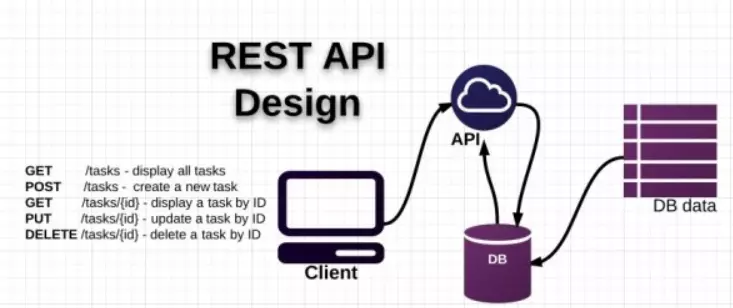
Các thành phần của nó

API (Application Programming Interface) là một tập các quy tắc và cơ chế mà theo đó, một ứng dụng hay một thành phần sẽ tương tác với một ứng dụng hay thành phần khác. API có thể trả về dữ liệu mà bạn cần cho ứng dụng của mình ở những kiểu dữ liệu phổ biến như JSON hay XML.

REST (REpresentational State** T**ransfer) là một dạng chuyển đổi cấu trúc dữ liệu, một kiểu kiến trúc để viết API. Nó sử dụng phương thức HTTP đơn giản để tạo cho giao tiếp giữa các máy. Vì vậy, thay vì sử dụng một URL cho việc xử lý một số thông tin người dùng, REST gửi một yêu cầu HTTP như GET, POST, DELETE, vv đến một URL để xử lý dữ liệu.

RESTful API là một tiêu chuẩn dùng trong việc thiết kế các API cho các ứng dụng web để quản lý các resource. RESTful là một trong những kiểu thiết kế API được sử dụng phổ biến ngày nay để cho các ứng dụng (web, mobile…) khác nhau giao tiếp với nhau.

Chức năng quan trọng nhất của REST là quy định cách sử dụng các HTTP method (như GET, POST, PUT, DELETE…) và cách định dạng các URL cho ứng dụng web để quản các resource. RESTful không quy định logic code ứng dụng và không giới hạn bởi ngôn ngữ lập trình ứng dụng, bất kỳ ngôn ngữ hoặc framework nào cũng có thể sử dụng để thiết kế một RESTful API.

RESTful API hoạt động như thế nào?

Sau khi chúng ta biết được RESTful API là gì thì trong phần này chúng ta cùng tìm hiểu nguyên lý hoạt động của nó nhé. Giống như các giao thức truyền thông hay cấu trúc dữ liệu khác. Để hiểu được bản chất vấn đề thì trước hết cần phải hiểu nguyên lý hoạt động của nó.
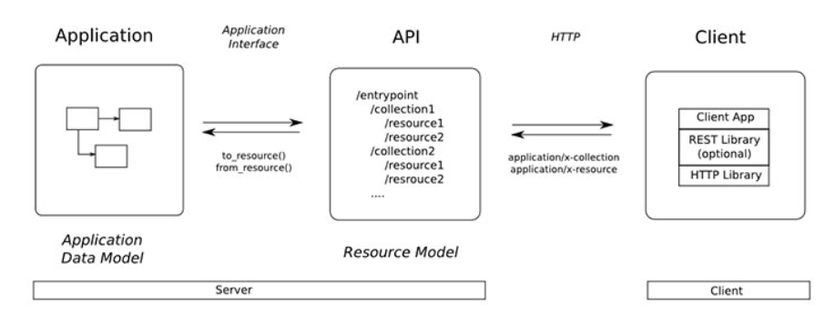
REST hoạt động chủ yếu dựa vào giao thức HTTP. Các hoạt động cơ bản nêu trên sẽ sử dụng những phương thức HTTP riêng.

  • GET (SELECT): Trả về một Resource hoặc một danh sách Resource.
  • POST (CREATE): Tạo mới một Resource.
  • PUT (UPDATE): Cập nhật thông tin cho Resource.
  • DELETE (DELETE): Xoá một Resource.

Những phương thức hay hoạt động này thường được gọi là CRUD tương ứng với Create, Read, Update, Delete – Tạo, Đọc, Sửa, Xóa.

Hiện tại đa số lập trình viên viết RESTful API giờ đây đều chọn JSON là format chính thức nhưng cũng có nhiều người chọn XML làm format, nói chung dùng thế nào cũng được miễn tiện và nhanh.

Authentication request và cấu trúc dữ liệu trả về

RESTful API không sử dụng session và cookie, nó sử dụng một access_token với mỗi request. Bạn có thể tìm hiểu JWT (JsonWebToken) để biết rõ hơn. Mình sẽ làm một bài về JWT trong phần sau nữa 😃) Dữ liệu trả về thường có cấu trúc như sau:

{
    "status_code": 200,
    "data": [
        {
            "name": "ManhLD",
            "email": "manhld@example.com",
            "ny": "not found"
        },
        {
            "name": "Ahri",
            "email": "ahriKDA@lmht.com",
            "ny": "Ezreal"
        }
    ],
    error_messages: ""
}

Ở trên là ví dụ về cấu trúc trả về của api get một list users trong hệ thống.

Status code

Khi chúng ta request một API nào đó thường thì sẽ có vài status code để nhận biết sau:

  • 200 OK – Trả về thành công cho những phương thức GET, PUT, PATCH hoặc DELETE.
  • 201 Created – Trả về khi một Resouce vừa được tạo thành công.
  • 204 No Content – Trả về khi Resource xoá thành công.
  • 304 Not Modified – Client có thể sử dụng dữ liệu cache.
  • 400 Bad Request – Request không hợp lệ
  • 401 Unauthorized – Request cần có auth.
  • 403 Forbidden – bị từ chối không cho phép.
  • 404 Not Found – Không tìm thấy resource từ URI
  • 405 Method Not Allowed – Phương thức không cho phép với user hiện tại.
  • 410 Gone – Resource không còn tồn tại, Version cũ đã không còn hỗ trợ.
  • 415 Unsupported Media Type – Không hỗ trợ kiểu Resource này.
  • 422 Unprocessable Entity – Dữ liệu không được xác thực
  • 429 Too Many Requests – Request bị từ chối do bị giới hạn

Trong Ruby on Rails có thể sử dụng symbol status code hoặc 3 chữ số integer

Quản lí version của api

Khi thiết api cho app ios hay client side, chúng ta nên đặt version cho các api. Ví dụ như endpoint sau: api/v1/users

Điều này sẽ giúp hệ thống sau khi nâng cấp lên version mới vẫn hộ trợ các api của version cũ, cũng như giúp việc bảo trì, sửa chữa dễ dàng hơn.

Ưu điểm của RESTFUL API là gì ?

Như trình bày ở trên, việc sử dụng RESTFUL API mang lại những hiệu quả nhất định cho các lập trình viên. Vậy những lợi ích nó mang lại là gì ? So với các phương pháp khác nó sẽ có điểm gì vượt trội
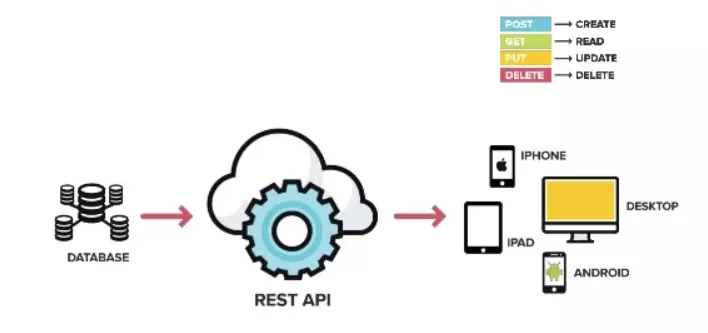
Một số ưu điểm chính khi sử dụng RESTFUL API là:

  • Giúp cho ứng dụng rõ ràng hơn
  • REST URL đại diện cho resource chứ không phải hành động
  • Dữ liệu được trả về với nhiều định dạng khác nhau như: xml, html, json….
  • Code đơn giản và ngắn gọn
  • REST chú trọng vào tài nguyên của hệ thống

Những trang web ngày nay thường sử dụng REST API để cho phép kết nối đến dữ liệu của họ. Trong đó, facebook cũng cung cấp các REST API để giúp các ứng dụng bên ngoài kết nối đến dữ liệu của họ

Cuối cùng

Cảm ơn vì các bạn đã đọc đến đây, hi vọng sẽ giúp ít cho các bạn mới tìm hiểu về RESTful API. Trong bài tiếp theo, mình sẽ build một app RESTful API với Ruby on Rails, hẹn gặp lại các bạn trong lần tới. Một lần nữa cảm ơn các bạn

Thursday, May 28, 2020

What is the difference between PUT, POST and PATCH?

POST

HTTP.POST can be used when the client is sending data to the server and the server will decide the URI for the newly created resource. The POST method is used to request that the origin server accept the entity enclosed in the request as a new subordinate of the resource identified by the Request-URI in the Request-Line.

The RFC describes the function of POST as:

The POST method is used to request that the origin server accept the entity enclosed in the request as a new subordinate of the resource identified by the Request-URI in the Request-Line.

This allows the client to create resources without knowing the URI for the new resource. For example, we can send a POST request to /projects to create a new project. The server can now create the project as a new subordinate of /project, for example: /projects/123. So when using POST for resource creation the server can decide the URI (and typically the ID) of the newly created resources.

When the server created a resource, it should respond with the 201 (Created) status code and a Location header that points to the newly created resource.

For example:

Request:

POST /projects HTTP/1.1
Content-Type: application/json

{
    "name": "my cool project",
    ...
}

Response:

HTTP/1.1 201 Created
Location: https://cool.api.com/projects/123

PUT

HTTP.PUT can be used when the client is sending data to the server and the client is determining the URI for the newly created resource. The PUT method requests that the enclosed entity be stored under the supplied Request-URI. If the Request-URI refers to an already existing resource, the enclosed entity SHOULD be considered as a modified version of the one residing on the origin server. If the Request-URI does not point to an existing resource, and that URI is capable of being defined as a new resource by the requesting user agent, the origin server can create the resource with that URI.

The main difference between POST and PUT is a different meaning of the request URI. The HTTP RFC says:

The URI in a POST request identifies the resource that will handle the enclosed entity. [..] In contrast, the URI in a PUT request identifies the entity enclosed with the request [..] and the server MUST NOT attempt to apply the request to some other resource.

enter image description here

PATCH

HTTP.PATCH can be used when the client is sending one or more changes to be applied by the server. The PATCH method requests that a set of changes described in the request entity be applied to the resource identified by the Request-URI. The set of changes is represented in a format called a patch document.

Monday, July 8, 2019

Rest table

HTTP methods
URICollection resource, such as https://api.example.com/collection/Member resource, such as https://api.example.com/collection/item3
GETRetrieve the URIs of the member resources of the collection resource in the response body.Retrieve representation of the member resource in the response body.
POSTCreate a member resource in the collection resource using the instructions in the request body. The URI of the created member resource is automatically assigned and returned in the response Location header field.Create a member resource in the member resource using the instructions in the request body. The URI of the created member resource is automatically assigned and returned in the response Location header field.
PUTReplace all the representations of the member resources of the collection resource with the representation in the request body, or create the collection resource if it does not exist.Replace all the representations of the member resource or create the member resource if it does not exist, with the representation in the request body.
PATCHUpdate all the representations of the member resources of the collection resource using the instructions in the request body, or may create the collection resource if it does not exist.Update all the representations of the member resource, or may create the member resource if it does not exist, using the instructions in the request body.
DELETEDelete all the representations of the member resources of the collection resource.Delete all the representations of the member resource.

Saturday, October 20, 2018

Sunday, October 14, 2018

REST API with JSON

What is REST API?

REST stands for Representational State Transfer. It relies on a stateless, client-server, cacheable communications. In most cases it is used with the HTTP protocol.
RESTful applications use HTTP requests to POST (create), PUT (create and/or update), GET (e.g., make queries), and DELETE data. REST uses HTTP for all four CRUD (Create/Read/Update/Delete) operations.

What is JSON?

JSON (JavaScript Object Notation) is a lightweight data-interchange format. It is easy for humans to read and write. It is easy for machines to parse and generate.

Protocols

HTTP allows different protocols to be used for the communication between the client and the server. We won’t explain all of them but the four most commonly used: GET, PUT, POST and DELETE.
GET, PUT and DELETE should be implemented as idempotent methods. No matter how many times requests are repeated, the result should be the same. POST, on the other hand, should not be idempotent.

GET

GET performs some kind of a query. It does not request any change to the state of the system in any form or way. This does not mean that the server is not performing some change to its state but that the client did not request it. When performing a GET request, server should respond with the result in the form of JSON.

POST

POST is a request to create a new entity. Content of that entity should be enclosed in the request body.

PUT

PUT is similar to POST with a difference that it should create a new entity if one does not exist or modify the existing one.

DELETE

DELETE is a request to delete a specified entity from the server.

Requests to the server

Avoid using non-nouns like getAllBooks or createNewBook. Type of the action to be performed is specified with the HTTP methods GET, POST, PUT and DELETE. URI should specify entity upon which operations should be performed on. For example, GET /books should retrieve books from the server, DELETE /books should delete the book, PUT /books should modify or create the book and POST /book should request creation of the book in the server.
In case of a GET method, the rest of the URI should provide information regarding type of the query server should use to retrieve requested data. Use query parameters within the URI itself. For example, /books should return all books. /books/id/24 should return the book identified with the ID 24. /books/pageSize/25 should return only 25 books.
The rest of methods (POST, PUT and DELETE) should have all the information enclosed in the message body in the JSON format.
Similarly as with the GET method, DELETE might apply to one specific data, subset of data or all of them (if that’s allowed by the server). If one would want to delete one book DELETE /book request would have JSON {id: 24} in the body. Similarly, if one would want to delete books that match some broader criteria, JSON would be {author: ‘Viktor Farcic’}. Finally, if there is no body, all books would be deleted.
POST and PUT work in a similar fashion like DELETE. Their request body has the information what should be created or modified. One could put a single entity into the body of the request PUT /books. That request would create or modify a single book. An example could be {id: 12345, title: ‘Behavior-Driven Development’, author: ‘Viktor Farcic’}. If bulk insert is allowed, multiple entities can be passed as an array [{title: ‘Behavior-Driven Development’, author: ‘Viktor Farcic’}, {title: ‘Continuous Integration’, author: ‘Viktor Farcic’}].
Keep in mind that the server is responsible to verify whether some request is allowed or not. Operation to delete more than one book could be restricted only to certain users and the DELETE request without the body (delete all) can be denied for all users. The ultimate responsibility to decide whether a request is allowed or not is in the hands of the server.
To summarize, GET does not have the body and uses URI to specify entity (i.e. /books) and, when needed, additional query parameters (i.e. id/24). POST, PUT and DELETE should not specify query parameters through the URI but use the message body to pass the information regarding what should be created, modified or deleted.

Responses from the server

Responses from the server should be always in JSON format and consistent. They should always contain meta information and, optionally, data. Consistency allows consumers of our API to know what to expect. Also, it allows us to write less implementation code since some parsing can be performed in a unified way across all request types.
HTTP response already contains status (more information about the status codes can be found in Status Code Definitions). We can enhance that with meta information could contain additional information. Additional information specific to the implementation in the server could be provided with, for example, error and message. As a general rule, when the client receives a response with HTTP status 2XX, the request was successful. Responses with status 4XX represent errors provoked by the client (i.e. mandatory data is missing) and 5XX are server errors.
Data should be specified even when none is sent from the server.
Few examples would be:
1
2
3
4
5
6
7
8
9
{
  meta: {
  },
  data: {
    id: 24,
    title: 'Behavior-Driven Development',
    author: 'Viktor Farcic'
  }
}
1
2
3
4
5
6
7
8
{
  meta: {
    error: 789,
    message: 'Title field is required'
  },
  data: {
  }
}

Versioning

Since API will not be the only entry point for HTTP requests, it is often a good idea to differentiate API URIs from others. I tend to put prefix api to all URIs.
It is important to understand that once an API is published and others start using it, we need to make sure that future changes do not break the usage for those who did not update their clients accordingly. For that reason it is a good practice to prefix all API URIs with version number. First one could be called v1, next one v2 and so on. This way we’ll have freedom to implement changes that might potentially introduce incompatibilities as a separate URI.
With those two things in mind, our previous example with book would look something like following: /api/v1/books

Examples

Finally, let’s go through few examples with books.

Request the list of books

Protocol: GET
URI: /api/v1/books
Request body: EMPTY
Response:
1
2
3
4
5
6
7
8
9
10
11
12
13
{
  meta: {
  },
  data: [{
    id: 24,
    title: 'Behavior-Driven Development',
    author: 'Viktor Farcic'
  }, {
    id: 25,
    title: 'Continuous Integration',
    author: 'Viktor Farcic'
  }]
}
Description: Requests all books to be retrieved from the server.

Request a single book

Protocol: GET
URI: /api/v1/books/id/24
Request body: EMPTY
Response:
1
2
3
4
5
6
7
8
9
{
  meta: {
  },
  data: {
    id: 24,
    title: 'Behavior-Driven Development',
    author: 'Viktor Farcic'
  }
}
Description: Requests the book with ID 24 to be retrieved from the server.

Request book creation

Protocol: POST
URI: /api/v1/books
Request body:
1
2
3
4
5
{
  id: 24,
  title: 'Behavior-Driven Development',
  author: 'Viktor Farcic'
}
Response with status 201:
1
2
3
4
5
6
7
{
  meta: {
  },
  data: {
    uri: /api/v1/books/id/24
  }
}
Description: Requests the book to be created. Server response is 201 (created) with URI that can be used by the client to retrieve the requested book.

Request the book to be created or modified

Protocol: PUT
URI: /api/v1/books
Request body:
1
2
3
4
{
  id: 24,
  author: 'Viktor Farcic'
}
Response with status 412:
1
2
3
4
5
6
7
8
{
  meta: {
    error: 789,
    message: 'Title field is required'
  },
  data: {
  }
}
Description: Requests the book to be modified or created. Server response is 412 (precondition failed) with error code and message describing the problem.

Request the book removal

Protocol: DELETE
URI: /api/v1/books
Request body:
1
2
3
{
  id: 24
}
Response with status 202:
1
2
3
4
5
6
{
  meta: {
  },
  data: {
  }
}
Description: Requests the book to be removed. Server response is 202 (accepted) meaning that the server accepted the request but the processing has not been completed. In other words, server responded immediately and has the removal pending.